In today's digital age, small businesses need every advantage they can get to compete with larger companies. QR codes have emerged as a powerful, cost-effective tool that can level the playing field. Whether you're running a local restaurant, a retail shop, or a service-based business, QR codes can help you connect with customers, share information instantly, and drive engagement.
What Are QR Codes and Why Do They Matter?
QR codes (Quick Response codes) are two-dimensional barcodes that can be scanned with any smartphone camera. When scanned, they instantly redirect users to websites, contact information, social media profiles, or other digital content. For small businesses, this means you can bridge the gap between physical and digital marketing effortlessly.
Using a free QR code generator like MultiLinkQR, you can create both single-link QR codes (for direct redirects to one URL) and multi-link QR codes (that open multiple links or show buttons). This flexibility makes QR codes perfect for various business needs.
Key Benefits of QR Codes for Small Businesses
1. Instant Access to Information
Customers can instantly access your website, menu, product catalog, or contact information with a simple scan. No need to type URLs or search for your business online. This convenience improves customer experience and reduces friction in the customer journey.
2. Cost-Effective Marketing
Creating QR codes is completely free with tools like MultiLinkQR. Once generated, you can print them on business cards, flyers, posters, or product packaging. There's no ongoing cost, making QR codes one of the most affordable marketing tools available.
3. Trackable Engagement
While basic QR codes don't track scans directly, you can use analytics on your landing pages to see how many people visit through QR codes. This helps you measure the effectiveness of your marketing campaigns.
4. Versatile Applications
QR codes can be used in countless ways:
- Business cards: Share your website, social media, and contact info
- Menus: Link to online menus, ordering systems, or special offers
- Product packaging: Direct customers to product information, reviews, or tutorials
- Point-of-sale displays: Promote special offers, loyalty programs, or new products
- Event materials: Share schedules, speaker bios, or networking information
Practical Examples: How Different Businesses Use QR Codes
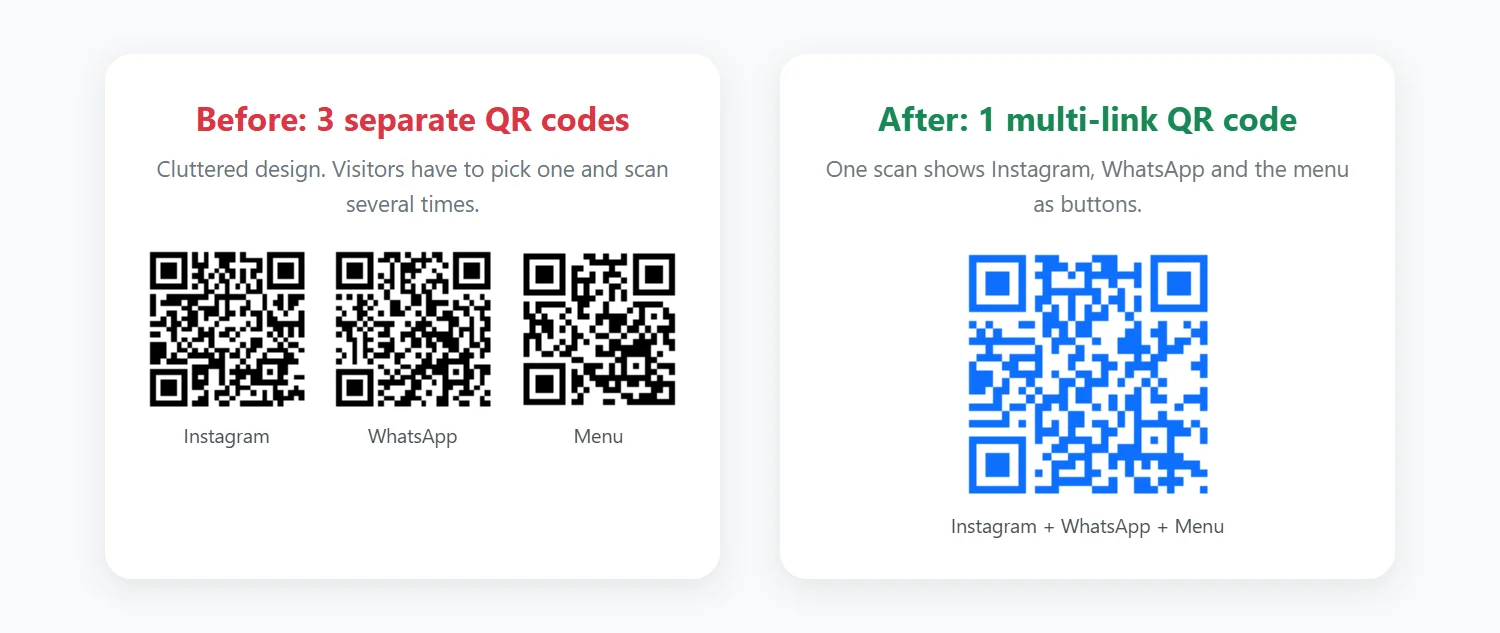
Here are common, realistic setups you can copy. Each one uses a single multi-link QR code instead of several separate codes.
Café or small restaurant
A code on every table links to the menu, today's specials on Instagram, a loyalty sign-up and a short feedback form. Space on a small table is limited, and one code keeps it tidy.
What to measure: add UTM parameters to the Instagram and loyalty links and compare visits before and after placing the codes.
Real estate agent
A code on the "For Sale" sign links to the listing, a virtual tour, neighborhood information and the agent's contact page. Buyers get details at the moment they are standing in front of the property.
What to measure: use a different UTM campaign per property to see which listings attract the most interest.
Clothing or gift boutique
A code on price tags or the fitting-room mirror links to the online shop (for sizes not in stock), a size guide and styling ideas. It connects the physical store with online orders.
What to measure: tag the online-shop link with utm_source=instore to see how many online orders start in the shop.
Step-by-Step Implementation Guide for Your Business
Ready to implement QR codes in your business? Follow this practical guide to get started effectively:
Step 1: Define Your Goal
Before creating a QR code, identify exactly what you want to achieve. Are you trying to increase social media followers, drive website traffic, collect customer feedback, or promote a specific product? Your goal will determine what links you include and where you place your QR codes. Be specific: "increase Instagram followers by 20%" is better than "get more social media engagement."
Step 2: Choose Single-Link or Multi-Link
If you have one clear destination (like a menu or specific product page), use a single-link QR code for the fastest, most direct experience. If you want to share multiple resources (social media, website, contact info, and reviews), use a multi-link QR code that creates a mobile landing page with all your links.
Step 3: Create Your QR Code
Visit MultiLinkQR and select your link mode. For single-link codes, paste your destination URL. For multi-link codes, add all relevant URLs with descriptive labels like "View Our Menu," "Follow on Instagram," or "Read Reviews." Customize your QR code's colors and design if desired, though standard black-on-white offers the best scanning reliability.
Step 4: Test Thoroughly
Before printing, test your QR code with multiple devices—iPhone, Android, older phones if possible. Ensure all links work correctly and load quickly on mobile. Check that your destination pages are mobile-optimized, as 100% of QR code scans come from mobile devices. Test from different distances and lighting conditions to verify scannability.
Step 5: Place Strategically
Location matters enormously. Place QR codes where customers have time to scan (table tents, waiting areas, checkout counters), not where they're rushing (doorways, narrow hallways). Ensure adequate lighting and make codes at least 1.5 inches square for easy scanning. Add clear instructions like "Scan for exclusive offers" to encourage action.
Step 6: Monitor and Optimize
Use URL shorteners with analytics (like Bitly) as your destination URLs to track scans and engagement. After 2-4 weeks, analyze which placements generate the most scans and which drive desired actions. Adjust your strategy based on data: move underperforming QR codes to better locations or update their destinations.
Common Mistakes to Avoid
Learning from others' mistakes saves time and money. Here are the most common QR code errors small businesses make and how to avoid them:
Mistake 1: Making QR Codes Too Small
QR codes smaller than 1 inch square often fail to scan, especially from typical scanning distances. Many businesses print business cards with tiny QR codes that frustrate customers. Solution: Maintain a minimum size of 1.5 x 1.5 inches for reliable scanning, and scale up for greater distances.
Mistake 2: Linking to Non-Mobile-Optimized Pages
Since every QR scan comes from a smartphone, directing users to desktop-only websites creates a terrible experience. Pages that require pinch-zooming to read text or have tiny click targets will lose customers immediately. Solution: Always ensure destination pages are mobile-responsive with large, touchable buttons and readable text.
Mistake 3: No Clear Call-to-Action
A bare QR code with no context leaves customers wondering what will happen if they scan. This uncertainty dramatically reduces scan rates. Solution: Always include a clear benefit statement like "Scan for 10% off your next order" or "Scan to see our full menu" near your QR code.
Mistake 4: Using QR Codes Without Testing
Printing 1,000 business cards before testing your QR code can be costly if the code doesn't work or links to the wrong destination. Solution: Test with at least 3 different phones in various lighting conditions before any large print run. Have colleagues who weren't involved in creation test it to verify the experience is intuitive.
Mistake 5: Placing QR Codes in Inaccessible Locations
QR codes on moving vehicles, behind glass reflections, or in areas without phone signal cannot be scanned effectively. One restaurant placed codes on outdoor signs where customers couldn't stand close enough to scan. Solution: Place QR codes where customers can comfortably position their phones 6-12 inches away with stable footing and adequate lighting.
Single-Link vs Multi-Link QR Codes for Business
When choosing between single-link and multi-link QR codes, consider your specific needs:
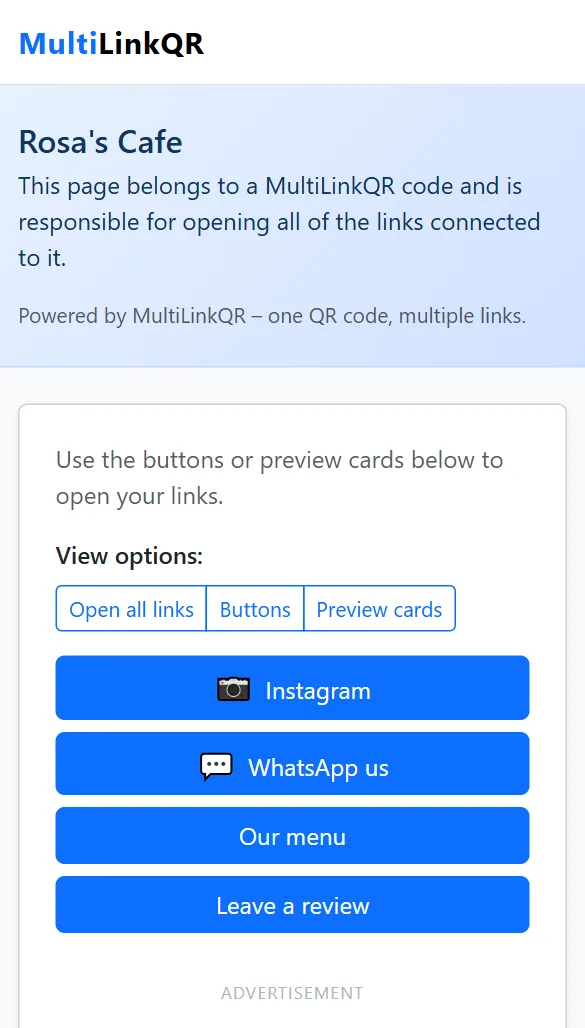
Single-link QR codes are perfect when you want to direct customers to one specific destination, such as your main website, a landing page, or a specific product. They're simple, fast, and ideal for focused campaigns.
Multi-link QR codes are excellent for business cards or marketing materials where you want to share multiple links at once. With MultiLinkQR, you can create a QR code that opens your website, Instagram, LinkedIn, WhatsApp, and more with a single scan. This is perfect for comprehensive brand presence.
Best Practices for Business QR Codes
To maximize the effectiveness of your QR codes:
- Make them large enough to scan easily (at least 1.5 inches square)
- Place them in visible, accessible locations where customers can pause
- Test your QR codes on multiple devices before printing
- Include clear benefit-driven instructions like "Scan for 10% off"
- Ensure all destination URLs are mobile-optimized
- Use high contrast colors for better scanning reliability
- Add your logo or brand colors while maintaining scannability
- Monitor performance and iterate based on scan data
Frequently Asked Questions About Business QR Codes
Do QR codes expire or stop working?
Static QR codes (like those from MultiLinkQR) never expire. The code itself is permanent. However, if the destination URL stops working or you change your website address, the QR code will link to a broken page. Always use URLs you control long-term, or use URL redirects so you can change destinations without reprinting codes.
Can I track how many people scan my QR codes?
While basic static QR codes don't include built-in tracking, you can add tracking by using analytics-enabled URL shorteners like Bitly or UTM parameters in your destination URLs. This shows you scan counts, locations, devices used, and user behavior after scanning. Most businesses find this data valuable for measuring ROI.
Are QR codes still relevant in 2026?
Absolutely. QR code usage increased significantly during 2020-2023 and continues growing. Most smartphones now have built-in QR scanning in their native cameras, eliminating the need for separate apps. Businesses across all industries use QR codes successfully, from restaurants and retail to professional services and real estate. The convenience they offer ensures continued relevance.
How much does it cost to create QR codes for my business?
Creating static QR codes is completely free with tools like MultiLinkQR. There are no hidden fees, no monthly subscriptions, and no limits on scans. You simply generate your code, download it, and use it forever. The only costs you'll incur are printing expenses if you add codes to business cards or marketing materials.
What's the difference between static and dynamic QR codes?
Static QR codes (what MultiLinkQR creates) have the destination URL encoded directly in the code pattern. They're permanent, work offline, and are completely free. Dynamic QR codes use a redirect service that allows changing the destination after printing, but typically require ongoing subscription fees. For most small businesses, static codes are more cost-effective and reliable.
Getting Started with QR Codes
Ready to start using QR codes for your business? MultiLinkQR offers a free QR code generator that supports both single-link and multi-link QR codes. Simply visit our QR code generator, choose your link mode, add your URLs, customize the design, and download your QR code. No account needed, completely free, and ready to use in minutes.
Whether you're a small business owner looking to modernize your marketing or a startup trying to maximize your limited budget, QR codes offer an affordable, effective way to connect with customers and grow your business.