You are on Instagram, TikTok, YouTube and LinkedIn, and people message you on WhatsApp. Asking someone to search for five usernames doesn't work, and five QR codes on one business card looks chaotic. The simple fix is one QR code for all your social media: people scan once and choose the platform they use. Here's how to set it up properly, for free.
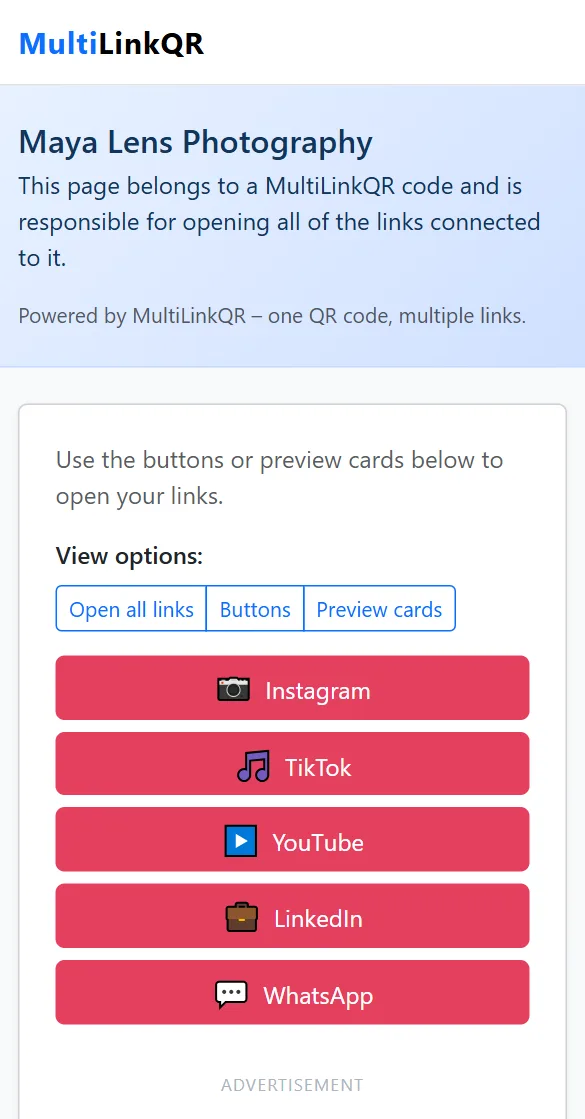
Why one QR code for all your social profiles works better
- People follow you where they already are. A TikTok user won't install LinkedIn to follow you, but they will happily tap "TikTok".
- One clean code on your print material instead of a row of codes and logos.
- No typing mistakes. Usernames with dots, underscores or numbers are easy to mistype; a scan isn't.
- Works everywhere: business cards, packaging, event badges, shop windows, flyers and slides.
Step 1: Collect the right profile links
The most common mistake is using a link that opens the app's home page instead of your profile. Open each profile in a browser (not the app), check that it shows your page, and copy the address. The usual formats are:
- Instagram:
https://instagram.com/yourusername - TikTok:
https://tiktok.com/@yourusername - YouTube:
https://youtube.com/@yourhandle - LinkedIn:
https://linkedin.com/in/your-name(personal) orhttps://linkedin.com/company/your-company - Facebook:
https://facebook.com/yourpage - X (Twitter):
https://x.com/yourhandle - WhatsApp:
https://wa.me/15551234567. Use your full number with country code and no plus sign, spaces or dashes.
Links copied from an app's "Share profile" button often contain long tracking parts after a question mark. They work, but they make your QR code denser. Remove everything from the ? onwards if the link still opens your profile without it.
Step 2: Create the QR code
- Open the free generator and select Multi-Link mode.
- Enter your name or brand as the title. It appears at the top of the page after scanning.
- Add each profile link and label it with the platform name ("Instagram", "TikTok", "YouTube", "LinkedIn", "WhatsApp"). The page then shows the matching icon next to each button automatically.
- Put your most important platform first. It becomes the top button.
- Choose Show buttons only as the open mode. Opening five apps at once isn't what anyone wants.
- Pick a color. Instagram pink, YouTube red and LinkedIn blue are available as presets if you want to match your main platform.
- Click Generate QR Code, test it with your phone, and download it as PNG or SVG.
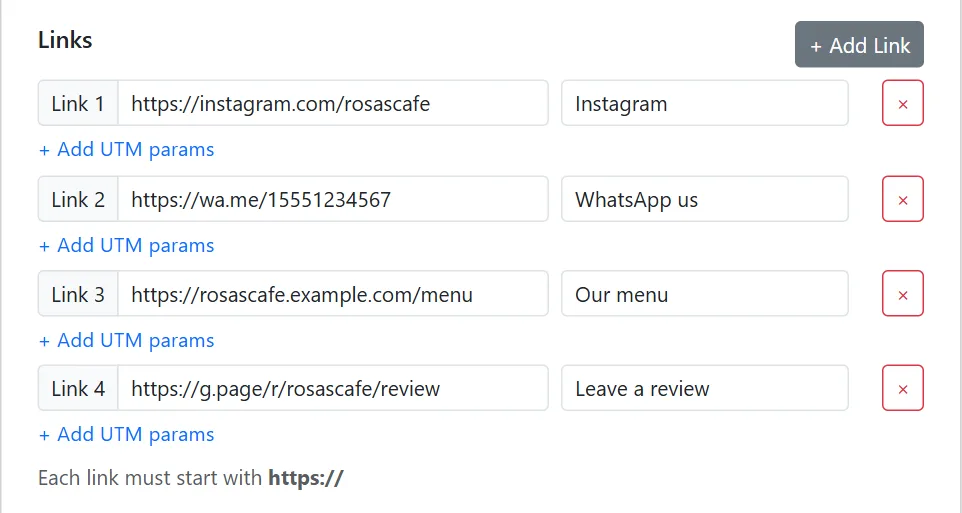
Need more detail on any step? Our step-by-step guide to putting multiple links in one QR code has screenshots of every screen.
Which platforms should you include?
More isn't always better. Every link adds a button to scroll past and makes the QR pattern denser. Include:
- The 2–3 platforms where you are active every week.
- One way to contact you directly (WhatsApp, email or a booking page).
- Your website or shop if you have one.
Leave out accounts you haven't posted on in months. An abandoned profile makes a worse impression than a missing one.
Where to use your social media QR code
- Business cards: print the code at least 2.5 cm (1 inch) wide. See our visiting card guide.
- Product packaging and thank-you cards: turn customers into followers after they buy.
- Shop counters and windows: "Follow us for daily offers".
- Event badges, slides and stands: let people connect without spelling usernames.
- Posters and flyers: combine your social links with a website or event page.
Design tips
- Keep a dark code on a light background. Brand colors are fine as long as the contrast stays strong.
- Add a short line next to the code, for example "Scan to follow us on Instagram, TikTok and YouTube". People scan more when they know what they will get.
- If you add your logo, keep it simple and test the code afterwards.
Common mistakes
- Linking to the app instead of your profile. Always test each button.
- Labels like "Link 1". Use the platform name so the right icon appears.
- Forgetting to update after a username change. The links are stored in the code, so a changed username means a new QR code.
Frequently asked questions
Is this free?
Yes, free with no sign-up and no watermark.
Is this like Linktree?
The idea is similar: one link that leads to all your links. The difference is that MultiLinkQR is built around the QR code and needs no account. The page is created from the link itself.
Can I use the same link in my Instagram bio?
Yes. After generating, click Copy URL and paste that link wherever you want: your bio, email signature or chats.
Create your social media QR code
Put all your profiles in one QR code. Free, no sign-up, ready in two minutes.
Generate QR Code Free Read More Guides