Do QR Codes Expire? How to Make One That Never Does
Do QR codes expire? Learn why static QR codes never expire, why cheap trial generators deactivate your codes, and how to create permanent QR codes for free.
You spent money printing 500 business cards, acrylic table tents, or product stickers. Two weeks later, a customer tells you the code is broken. You scan it with your phone, only to see an error page saying your free trial has ended and demanding a monthly fee.
This frustrating scenario is one of the most common complaints in digital marketing. So, do qr codes expire, and how can you ensure your printed marketing materials work forever?
Quick answer: Standard static QR codes never expire because their data is baked directly into the pattern. However, dynamic QR codes created on trial-based generators do expire after 14 days when vendors lock the redirection link. MultiLinkQR solves this by providing 3 dynamic QR codes free with a binding Never-Die guarantee that keeps your codes active forever.
Do QR codes expire? The technical truth
The short answer is no, technical QR codes do not expire.
A QR code is simply a two-dimensional barcode standardized internationally under ISO/IEC 18004. Invented in 1994 by Masahiro Hara at Denso Wave, the QR specification defines how data characters are translated into black and white geometric modules.
Just like a printed book doesn't expire and a traditional supermarket barcode on a cereal box doesn't stop scanning, the physical pattern of a QR code remains readable by smartphone cameras forever. As long as the printed graphic has good contrast and is not physically torn or faded, cameras can decode its characters decades from now.
However, whether the code works for your customers depends entirely on the type of QR code you created: static or dynamic.
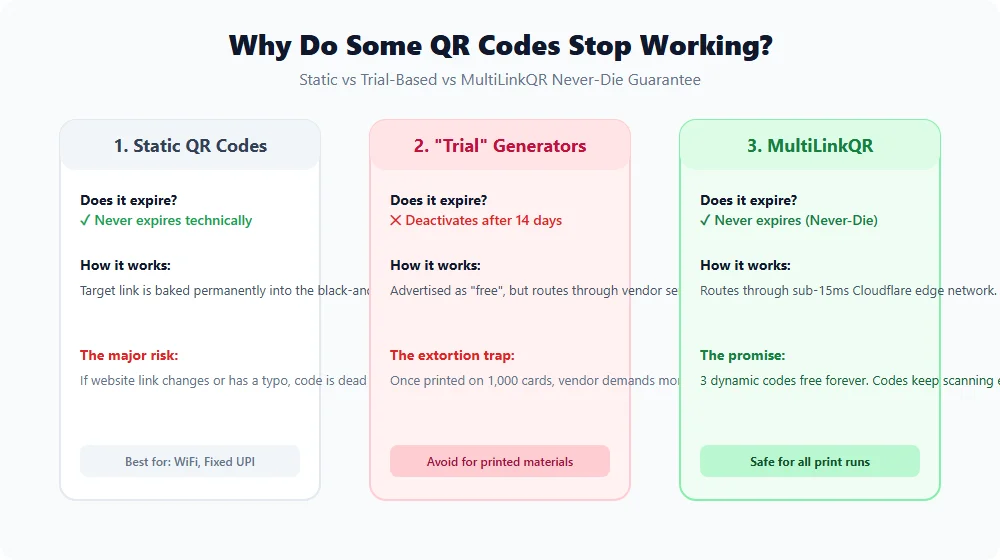
Static vs dynamic QR codes: Why some stop working
To understand why codes stop working, you must understand the distinction between static and dynamic architecture. For a comprehensive walkthrough, read our guide on dynamic vs static QR codes.
1. Static QR codes (Never expire)
In a static QR code, your destination data is directly encoded into the square matrix.
- Examples: Plain text, WiFi network credentials, phone numbers, standard vCard contact cards, and fixed UPI payment strings.
- Why they never expire: When a smartphone camera scans a static code, it reads the data directly from the pixels. No server or intermediate website is contacted. The code works offline in airplane mode.
- The downside: Because the data is permanent, you can never change the URL or fix a spelling typo. If your website changes or your domain lapses, your printed code becomes a useless dead end.
2. Dynamic QR codes (Depend on the redirection server)
In a dynamic QR code, the printed matrix does not encode your long final destination URL. Instead, it encodes a short redirection link (such as go.multilinkqr.com/summer-sale).
When a customer scans the code, their mobile browser requests the short link from the server. The server looks up your current destination URL and instantly redirects the customer.
- The advantage: You can update the destination URL thousands of times from your dashboard without reprinting. You can fix typos in 5 seconds and view scan analytics. Learn how in our guide on how to create a free dynamic QR code.
- The risk: If the company hosting the short redirection link deactivates your account, goes bankrupt, or deletes your link, your printed QR code stops routing.
The 14-day free trial trap: Why did my QR code stop working?
If you created a QR code on a generic search engine result and it stopped working after two weeks, you fell victim to the free trial trap.
Many online QR generators employ an aggressive business model:
- They rank on search engines for phrases like "free QR code generator".
- They allow you to create a dynamic QR code without requiring a credit card up front.
- They let you download the code and print it on menus, flyers, standees, or business cards.
- Exactly 14 days later, their server deactivates your redirect link.
- When customers scan your code, they see a warning: "This QR code has expired. The owner must upgrade to a premium plan."
- The vendor demands $25 to $40 every month to turn your code back on.
Because business owners have already spent thousands of rupees on physical printing, many feel coerced into paying recurring subscription fees just to keep their signs alive.
MultiLinkQR was created specifically to eliminate this predatory practice.
How MultiLinkQR guarantees your QR codes never die
At MultiLinkQR, we believe printed materials should be permanent. When you print a QR code on a store window, an exhibition booth, or a restaurant menu, you deserve complete peace of mind.
We enforce this through our binding Never-Die Promise.
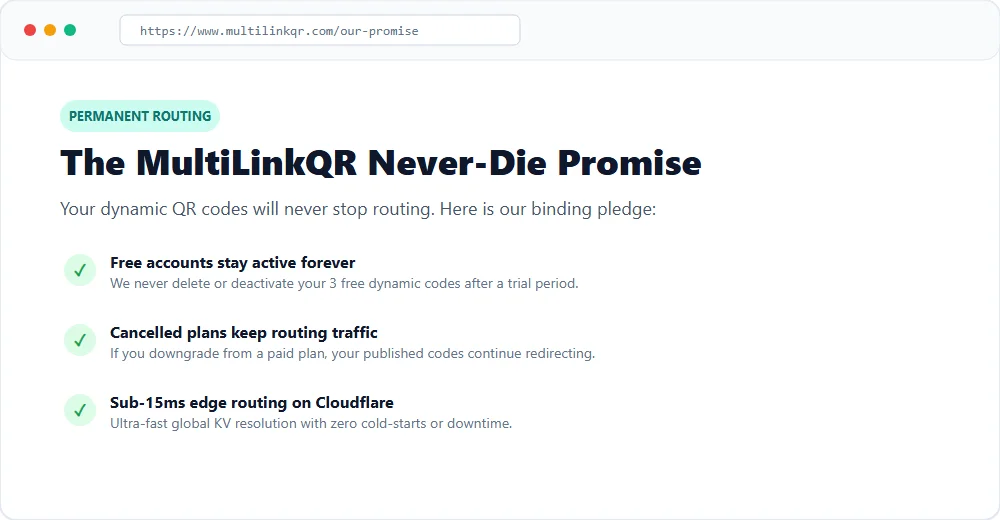
Here is how MultiLinkQR guarantees permanent uptime:
- 3 Free Dynamic QR Codes Forever: Every registered user receives 3 dynamic QR codes on our Free plan. We never deactivate them after 14 days, and we never ask for a credit card.
- Unlimited Scans Without Caps: We do not throttle or disable your codes when you have a busy weekend. Your codes handle unlimited customer scans.
- Cancelled Subscriptions Keep Routing: If you upgrade to a paid plan for advanced features and later decide to cancel, your existing published codes continue routing traffic forever. Read our full policy on our promise page.
- Sub-15ms Edge Redirection: MultiLinkQR is built on Cloudflare's global edge network. Your redirects resolve at the nearest data center with instantaneous performance and 99.99% uptime.
- Legacy Compatibility: Even dynamic codes generated on our original system (like
multi.html) continue redirecting properly today without disruption.
Review our transparent pricing plans to compare free entitlements and upcoming premium capabilities.
Checklist: How to choose a permanent QR code generator
Before approving an expensive print run for your business, verify these four questions with any QR code platform:
| Criteria | Dangerous Provider | Reliable Provider (MultiLinkQR) |
|---|---|---|
| Free Plan Duration | 14-day trial with automatic cutoff | Free forever with no expiration date |
| Credit Card Requirement | Required up front or after 14 days | Never required for free accounts |
| Scan Thresholds | Stops working after 50 or 100 scans | Unlimited scans on all plans |
| Downgrade Policy | Codes deleted if subscription ends | Published codes remain active forever |
| Export Formats | Low-res PNG only | Vector SVG, high-DPI PNG, and PDF |
How to create a permanent QR code that never expires
Follow these simple steps to generate a permanent code for your business:
Step 1: Decide between static or dynamic
- If you are creating a WiFi login code or a standard UPI merchant QR, choose a static code using our free tools catalog. Static codes carry zero external dependencies.
- If you are sharing a website, food menu, social media hub, or portfolio, choose a dynamic QR code so you can update links later.
Step 2: Generate your free dynamic code
- Sign up for a free account on MultiLinkQR.
- Enter your destination URL and name your code.
- Customize your colors, rounded dots, and corner eyes to match your branding.
- Export your high-resolution vector SVG file.
Step 3: Test scan before volume printing
Always print a single test proof on paper and scan it in various lighting conditions with both an iPhone and an Android device. Once verified, you can send your vector file to your commercial printer with complete confidence.
Frequently Asked Questions
Create Your Free Multi-Link QR Code Today
No monthly fees, zero forced watermarks, and our Never-Die promise means your QR codes will never break.

Related Guides
Free Dynamic QR Code: Edit the Link After Printing
Create a dynamic qr code free and edit the destination URL after printing without reprinting flyers or cards. Includes 3 free codes and scan tracking.
Multi-Destination QR Code: One Scan, Multiple Links
Learn how a multi-destination QR code works. Route customers to multiple website links, social profiles, and WhatsApp from a single free dynamic scan.
How to Put Multiple Links in One QR Code (Free Guide)
Learn how to put multiple links in one QR code for free. Create a mobile landing page for WhatsApp, Instagram, and menus without reprinting.